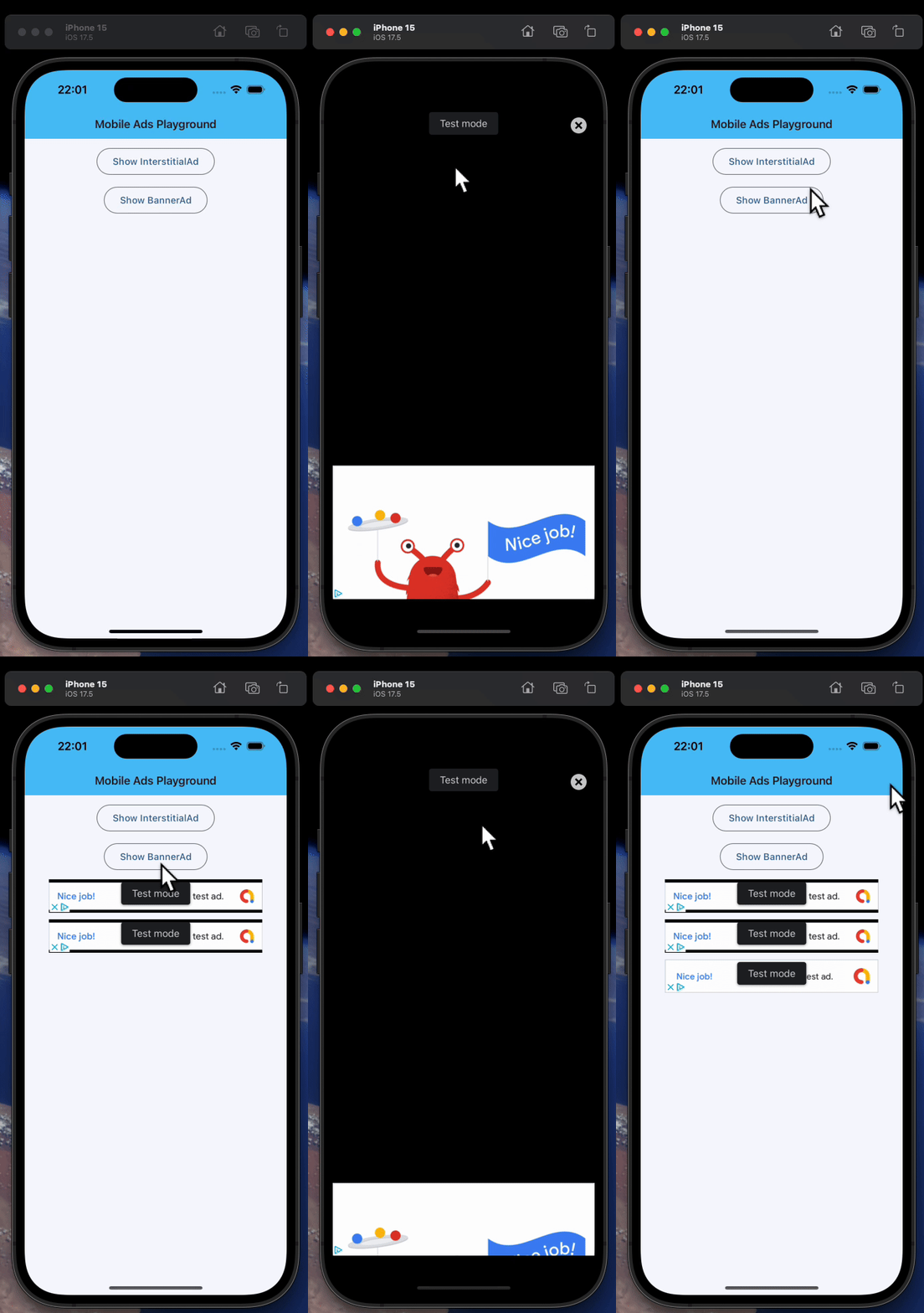
InterstitialAd
Displays a full-screen interstitial ad.
Note
Each instance is allowed to be shown (using show()) only once.
To show another ad, create a new instance. Reusing an already-shown instance
will result in errors or unexpected behavior.
Test IDs
AdMob provides
unit IDs for testing purposes. Set [unit_id][flet_ads.interstitial_ad.InterstitialAd.unit_id] to the appropriate value
based on the platform you're testing on:
- Android:
"ca-app-pub-3940256099942544/1033173712" - iOS:
"ca-app-pub-3940256099942544/4411468910"
Remember to replace them in production.
Raises:
-
FletUnsupportedPlatformException–When using this control on a web and/or non-mobile platform.
Examples#
Example 1#
import flet as ft
import flet_ads as fta

# Test ad unit IDs
ids = {
    ft.PagePlatform.ANDROID: {
        "banner": "ca-app-pub-3940256099942544/6300978111",
        "interstitial": "ca-app-pub-3940256099942544/1033173712",
    },
    ft.PagePlatform.IOS: {
        "banner": "ca-app-pub-3940256099942544/2934735716",
        "interstitial": "ca-app-pub-3940256099942544/4411468910",
    },
}


def main(page: ft.Page):
    page.appbar = ft.AppBar(
        adaptive=True,
        title="Mobile Ads Playground",
        bgcolor=ft.Colors.LIGHT_BLUE_300,
    )
    page.horizontal_alignment = ft.CrossAxisAlignment.CENTER
    page.scroll = ft.ScrollMode.AUTO

    def show_new_interstitial_ad():
        async def show_iad(e: ft.Event[fta.InterstitialAd]):
            await iad.show()

        iad = fta.InterstitialAd(
            unit_id=ids[page.platform]["interstitial"],
            on_load=show_iad,
            on_error=lambda e: print("InterstitialAd error", e.data),
            on_open=lambda e: print("InterstitialAd opened"),
            on_close=lambda e: print("InterstitialAd closed"),
            on_impression=lambda e: print("InterstitialAd impression"),
            on_click=lambda e: print("InterstitialAd clicked"),
        )

    def get_new_banner_ad() -> fta.BannerAd:
        return fta.BannerAd(
            unit_id=ids[page.platform]["banner"],
            width=320,
            height=50,
            on_click=lambda e: print("BannerAd clicked"),
            on_load=lambda e: print("BannerAd loaded"),
            on_error=lambda e: print("BannerAd error", e.data),
            on_open=lambda e: print("BannerAd opened"),
            on_close=lambda e: print("BannerAd closed"),
            on_impression=lambda e: print("BannerAd impression"),
            on_will_dismiss=lambda e: print("BannerAd will dismiss"),
        )

    page.add(
        ft.OutlinedButton(
            content="Show InterstitialAd",
            on_click=show_new_interstitial_ad,
            disabled=page.web or not page.platform.is_mobile(),  # mobile only
        ),
        ft.OutlinedButton(
            content="Show BannerAd",
            on_click=lambda e: page.add(get_new_banner_ad()),
            disabled=page.web or not page.platform.is_mobile(),  # mobile only
        ),
    )


ft.run(main)